


SaveUtils – FreeCAD Workbench Addon
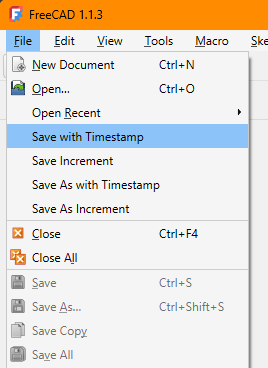
SaveUtils adds four convenience commands to FreeCAD's File menu:
| Command | What it does |
|---|---|
| Save with Timestamp | Saves as <basename>-YYYYMMDD-HHMMSS.FCStd |
| Save Increment | Saves as the next <basename>-01.FCStd, …-02.FCStd |
| Save As with Timestamp | Asks for a base filename, then saves as <base>-YYYYMMDD-HHMMSS.FCStd |
| Save As Increment | Asks for a base filename, then saves as the next <base>-01.FCStd, …-02.FCStd |
All four save the document under the new name and leave you working in that new file, exactly like FreeCAD's own Save As. The file you started in stays on disk as it last was.
The difference between the two pairs is only where the name comes from:
- The Save commands derive it automatically from the open document — no dialog.
- The Save As commands open a file dialog so you pick the base name yourself.
Behavior details
Naming
- Timestamp commands append
-YYYYMMDD-HHMMSS.FCStd. If the name already ends with that pattern it is replaced, not doubled:design-20240101-120000.FCStd→design-20240315-093045.FCStd - Increment commands append
-NN.FCStd, zero-padded to 2 digits. The folder is scanned for existing<basename>-NN.FCStdfiles and the highest number found is incremented, so repeated use never overwrites an earlier snapshot:design.FCStdwithdesign-01/design-02on disk →design-03.FCStd - Only counters directly following the basename count, so
design-detail-01.FCStddoes not affectdesign's numbering. - If the open file is itself an increment (
design-03.FCStd), the basename isdesign.
Unsaved documents
A document that has never been saved has no name to derive from, so the Save commands fall back to the same file dialog the Save As commands use.
The chosen name is a base
In the Save As commands the name you pick in the dialog is the base, not the final filename — picking design.FCStd writes design-20240315-093045.FCStd. Nothing is written to the name you typed, which is why the dialog does not ask about overwriting it.
Installation
Manual
Add this repository to your Addon Custom Repositories
- In FreeCAD, go to Edit > Preferences > Addon Manager.
- Under Costom Repositories, click the green plus button to Add https://github.com/jefe317/SaveUtils/ with the branch main.
- Click Apply, close the Preferences window.
- In Tools > Addon Manager, you can now search for "SaveUtils" and install it via the Install button.
- Restart FreeCAD. The four items appear near the top of the File menu.
Via Addon Manager
If this repo is listed in a custom addon source, you can install it through Tools > Addon Manager > Search for SaveUtils > Install.
Requirements
- FreeCAD 0.20 or later
- PySide2 (bundled with FreeCAD)
License
GPL v3